Getting Started
This page walks you through installation, configuration, and your first translation edit.
Install the package
uv add django-live-translations
poetry add django-live-translations
pip install django-live-translations
Configure Django
Add to installed apps
INSTALLED_APPS = [
    # ...
    "django.contrib.staticfiles",  # (1)!
    "live_translations",
]
- Required for serving the widget's CSS and JavaScript. A system check warning is raised if missing.
Add the middleware
MIDDLEWARE = [
    # ...
    "django.contrib.sessions.middleware.SessionMiddleware",
    "django.middleware.locale.LocaleMiddleware",
    "django.contrib.auth.middleware.AuthenticationMiddleware",
    "live_translations.middleware.LiveTranslationsMiddleware",  # (1)!
    # ...
]
- Must come after
AuthenticationMiddlewarebecause it needsrequest.userto check permissions.
Run migrations
python manage.py migrate
This creates the TranslationEntry and TranslationHistory tables used for the database backend and edit history. If you only use the PO file backend, migrations are still safe to run but the tables will remain empty (audit history is silently skipped when the tables don't exist).
Optional: customize settings
The defaults work out of the box for most projects. To customize, add a LIVE_TRANSLATIONS dict to your settings:
LIVE_TRANSLATIONS = {
    "LANGUAGES": ["en", "cs", "de"],
    "LOCALE_DIR": BASE_DIR / "locale",
}
See Configuration for all options.
Verify it works
- Log in as a superuser
- Navigate to any page with
{% translate %}orgettext()strings - Press Ctrl+Shift+E
Translatable strings appear with blue dashed outlines. Click any one to open the editor.
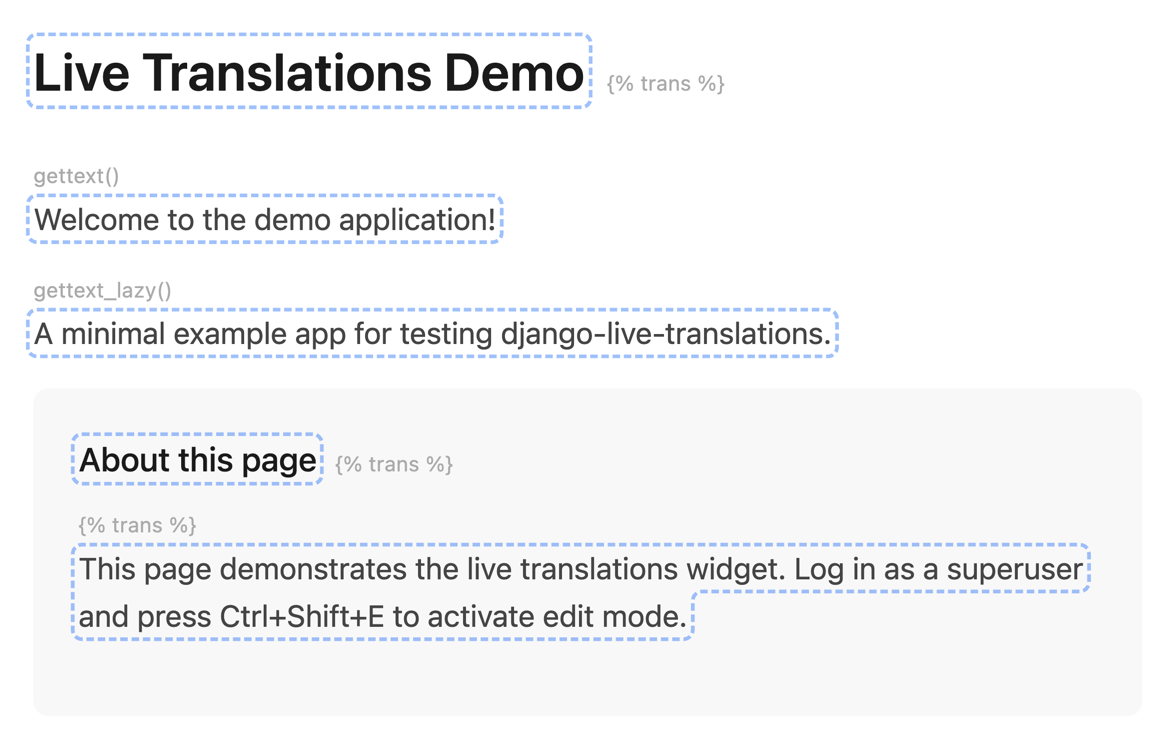
Edit mode highlights all translatable strings on the page.
Try the demo app
The repository includes an example app:
git clone https://github.com/vojtechpetru/django-live-translations
cd django-live-translations
pip install -e ".[dev]"
cd example
python manage.py migrate
python manage.py runserver
Open localhost:8000 and click "Quick Login" to create a superuser automatically. Press Ctrl+Shift+E to start editing. The demo uses the PO backend with English and Czech.
Next steps
- Editing to learn about the editor modal, preview mode, and history
- Backends to choose between PO file and database storage
- Permissions to control who can access the editor